米
首页
心情
图集
所有
搜索
登录
纯css美化的input,radio,CheckBox等【单选框复选框】
2021-07-12
45.48w热度
很多时候我们在写表单的时候,不想使用css框架,那就只能自己动手去美化单选框、复选框等样式,这里我给大家整理了纯css美化的单选框和复选框提供给大家使用。 著作权归原作者所有。 样式预览: [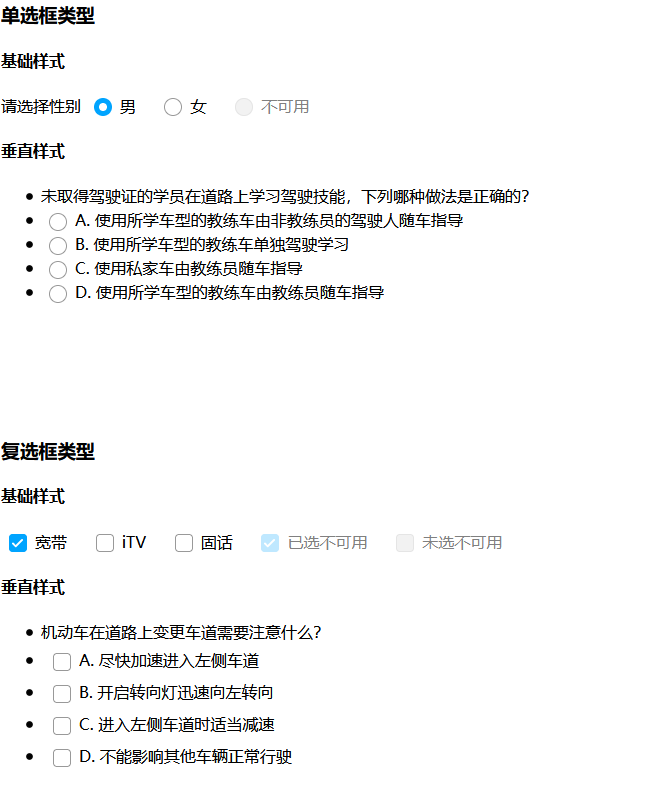](https://micuu.com/data/upload/20210712/60eba94c76889.png) 在线预览:http://micuer.com/yuanma/radioDemo.html ``` <style type="text/css"> body { font: 16px/150% microsoft yahei,pingfang sc,Tahoma,Sim sun; } input:disabled + label {/*禁用的指针*/ cursor: not-allowed } .Radio input, .Checkbox input { display: none } .Radio label, .Checkbox label { padding: 0 16px 0 0; display: inline-block; cursor: pointer; position: relative } .Radio label:before, .Checkbox label:before { box-sizing: border-box; content: ""; width: 18px; height: 18px; border-radius: 50%; border: 1px solid #999; margin: 0 8px; vertical-align: middle; display: inline-block; transition: 0.1S; } .Radio label:hover:before, .Checkbox label:hover:before { border-color: #00a4ff; } .Radio input:disabled + label:before, .Checkbox input:disabled + label:before { background-color: #CCC; border-color: #999; opacity: 0.5; } .Radio input:disabled + label, .Checkbox input:disabled + label { opacity: 0.5; } .Radio input:checked + label:before { border: 5px solid #00a4ff; } .Checkbox label:before { background: url(images/ico_tick.svg) no-repeat center; background-size: 0; border-radius: 4px; transition: 0.2S; } .Checkbox input:checked + label:before { background-color: #00a4ff; background-size: 16px; border-color: #00a4ff; } .HoverLabel label { display: block; border-radius: 4px; padding: 4px; width: 100%; } .HoverLabel label:hover { background-color: #EEE; } </style> ``` html ``` <h3>单选框类型</h3> <h4>基础样式</h4> <span class="Label"><span class="Mandatory"></span>请选择性别</span> <span class="Radio"> <input id="man" name="sex" type="radio" checked /><label for="man">男</label> <input id="female" name="sex" type="radio" /><label for="female">女</label> <input id="secret" name="sex" type="radio" disabled /><label for="secret">不可用</label> </span> <h4>垂直样式</h4> <ul class="Radio"> <li class="Black">未取得驾驶证的学员在道路上学习驾驶技能,下列哪种做法是正确的?</li> <li> <input id="safe1" name="safe" type="radio" /><label for="safe1">A. 使用所学车型的教练车由非教练员的驾驶人随车指导</label> </li> <li> <input id="safe2" name="safe" type="radio" /><label for="safe2">B. 使用所学车型的教练车单独驾驶学习</label> </li> <li> <input id="safe3" name="safe" type="radio" /><label for="safe3">C. 使用私家车由教练员随车指导</label> </li> <li> <input id="safe4" name="safe" type="radio" /><label for="safe4">D. 使用所学车型的教练车由教练员随车指导</label> </li> </ul> <div style="height: 100px"><!--就是个间隔没有什么用--></div> <h3>复选框类型</h3> <h4>基础样式</h4> <span class="Checkbox"> <input id="love1" type="checkbox" checked /><label for="love1">宽带</label> <input id="love2" type="checkbox" /><label for="love2">iTV</label> <input id="love3" type="checkbox" /><label for="love3">固话</label> <input id="love4" type="checkbox" disabled checked /><label for="love4">已选不可用</label> <input id="love5" type="checkbox" disabled /><label for="love5">未选不可用</label> </span> <h4>垂直样式</h4> <ul class="Checkbox HoverLabel"> <li class="Dot Bold">机动车在道路上变更车道需要注意什么?</li> <li> <input id="safe21" name="safe" type="checkbox" /><label for="safe21">A. 尽快加速进入左侧车道</label> </li> <li> <input id="safe22" name="safe" type="checkbox" /><label for="safe22">B. 开启转向灯迅速向左转向</label> </li> <li> <input id="safe23" name="safe" type="checkbox" /><label for="safe23">C. 进入左侧车道时适当减速</label> </li> <li> <input id="safe24" name="safe" type="checkbox" /><label for="safe24">D. 不能影响其他车辆正常行驶</label> </li> </ul> ```
注:原创不易,转载请注明出处(
http://www.micuu.com/new/1720.html
),本站所有资源来源于网络收集,如有侵权请联系QQ245557979进行清除。
最后修改与 2022-02-21
上一篇:
在也不怕别人打你了,看看挨打了怎么办?
下一篇:
宁宁老婆性感写真图集下载
▶
珍藏视频
▶
10分钟高效燃脂
▶
30天高效瘦脸操
▶
5分钟缓解颈椎操
友人
→
微博
→
全民K歌
→
唱吧
→
今日头条
→
悠悠网
→
科技小锅盖
→
彼岸桌面
→
阮一峰
→
laravel社区
→
V2ex
→
掘金
+
更多